Plugins
Gifts for Music Producers: Plugins, Vocal Presets and Sample Packs
Buying a gift for a music producer is harder than it looks. Most of what they want lives inside a computer, the names all sound alike, and the wrong format...
Studio One ships with a capable set of stock effects and instruments, and its Fat Channel already covers the basics of a vocal or a drum channel. Most producers still add a few third-party plugins for the jobs the stock set does not do on its own: vocal chains you can steer in plain words, real-time tuning, doubles that sit on the lead, 808s built from scratch, hi-hat patterns, build-ups that land on the bar and glue on the mix bus. This guide covers the plugins worth adding to a Studio One setup, where each one sits in a song, and how to keep a short list you will actually open.
Every plugin mentioned here comes from the plugins for Studio One collection. They ship as VST3 and AU, on Mac and Windows, so they load in Studio One on both systems.
Studio One treats third-party plugins like its own devices, with a few details worth knowing before you choose anything:
After installing, open the options (Preferences on Mac), go to Locations, then VST Plug-Ins, check that the VST3 system folder is listed, and rescan. On Mac, Audio Units show up as well. If a plugin still does not appear, the guide on how to install VST3 and AU plugins covers the usual folders and fixes.
Vocals are where Studio One users spend the most time, and where a good chain saves the most. The Fat Channel gives you a gate, compressor and EQ; these plugins cover what sits around it.
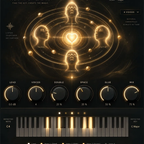
VoxShift stacks tuning, EQ, compression, saturation, doubler, delay, reverb and limiter in a single window, and ships with 409 ready-made chains for singing, rap, doubles, ad-libs and SFX. Auto Key finds the key of your vocal in about two seconds, and auto-gain keeps the output at the level of the dry vocal, so you can flip through chains without chasing the volume. On a Studio One vocal track it can replace a long row of inserts with one plugin.
Booth is a complete vocal chain of fourteen modules in the order a studio would use them: gate, tuning, a low voice, EQ, two compressors, de-esser, air, doubler, chorus, tempo-synced delay, an octave-up halo, reverb and a safety limiter. You type what you want in plain words, such as "warmer", "hard tune" or "delay 1/8", and Booth makes the changes and lists each one, before and after.
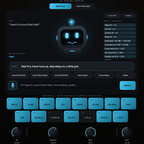
MIXI goes one step further: you press the mic and say what you want into the same microphone you record with. Its speech recognition runs inside the plugin, offline, on Mac and Windows, and it shows every value it touched. Both are a quick way to get a vocal in shape before you fine-tune the details.
Tune Live corrects a voice toward the nearest note of the key in real time, with an engine that leaves the formants where they are. RETUNE SPEED runs from an instant robotic effect to a transparent 200 ms, and FLEX-TUNE leaves slides and blue notes alone. Because it works in real time, it suits singers who want to hear the tuning in their headphones while they record in Studio One.
Harmony builds diatonic harmonies in the key of your song, thirds, fifths and octaves, each voice keeping the formants of the singer. Trace solves the other half of a stacked vocal: put it on the double, send the lead to its sidechain, press CAPTURE and play the section, and every word of the double lands on the timing of the lead without changing its pitch or tone. In Studio One, the sidechain source is picked from the button in the plugin header.
Smooth is a dynamic resonance suppressor: it finds the narrow peaks that stick out, such as sibilance, a muddy low-mid or the proximity effect of a close mic, and cuts them only while they last. Three knobs run it, and DELTA plays only what is being removed, which makes it easy to hear whether you went too far. It sits well after the Fat Channel compressor on a bright vocal.
If you prefer to start from settings made with Studio One's own tools, the Studio One vocal presets collection covers that route, and the article on Fat Channel settings for vocals explains how they are built.
Studio One's drum workflow is built around Impact and pattern editing. These plugins slot into it without changing it.
For the low end, Sub Heat adds four saturation characters that make 808s and basses audible on small speakers, and Lock measures the offset and polarity between a kick and a bass, then lines them up so both add up instead of cancelling. All three of Quaver, Punch and Sub Heat come together in the 808 Workflow bundle from the plugin bundles collection.
Studio One's Arranger track makes it easy to move whole sections around. What it does not do is write the build-up into the next section for you. These plugins do.
The last stage of a Studio One song usually happens on the main bus or in the Project page. Two plugins help before you get there.
Weld glues a mix or a master with one knob: pick one of six engines and turn AMOUNT. Inside, a compressor, a transient stage, a saturator, a tone shaper, a stereo stage, a clipper and a look-ahead limiter adapt to the level of the track, and CONTAIN holds the output peaks at the input peak level, so the mix gets denser without extra peak level. Aura adds air, presence and width with a chain of EQ, harmonic excitation and stereo widening tuned so the top end stays smooth, on a vocal bus, a synth bus or the main bus.
A long plugin folder slows you down. Pick by the job you do most:
Then save what works as an FX Chain, so the whole chain comes back with a single drag in the next song.
Black Friday: until December 1, TuneDrip plugins and plugin bundles take an extra 20% with code BLACKFRIDAY at checkout. The Black Friday plugin guide lists what to pick by use.
Studio One's stock tools handle the basics. The plugins that earn a place next to them are the ones that save a step you repeat in every song: a vocal chain you can steer quickly, tuning you can hear while you record, doubles that land on the lead, 808s and hi-hats that follow the song, build-ups that finish themselves and glue on the main bus. Start with the job you do most, keep the list short, and browse the full plugins for Studio One collection when a new job comes up.