Plugins
Best Plugins for Trap Beats: 808s, Hi-Hats and Build-Ups
Trap beats are built from a short list of parts: an 808 that carries the bass line, hi-hats that roll, a snare or clap with a sharp crack, a dark...
Bitwig Studio comes with a strong set of devices: EQ, compressors, delays, reverbs, synths, a sampler and The Grid for building your own. What it does not give you is speed on a few specific jobs, like a finished vocal chain, real-time tuning, an 808 that slides, or a build-up you can play with one knob. Those are the plugins worth adding.
This guide sorts them by job: vocals, low end, beats and transitions, and sound design. It also covers the setup steps that matter in Bitwig, plugin locations, hosting and sidechain. Every TuneDrip tool mentioned here is in the plugins for Bitwig collection.
Bitwig loads VST2, VST3 and CLAP plugins. It does not load Audio Units, even on a Mac.
Bitwig runs plugins in a separate process, so a crashing plugin does not take the whole project down. The hosting mode in the Plug-ins settings decides how plugins are grouped. If one plugin misbehaves, set it to run on its own from the device menu and leave the rest as they are.
Know what the stock devices do well before you add anything. EQ+ is a clean, flexible EQ. The compressors cover bus and vocal work, and most of them take a sidechain. Delay+ and Reverb handle space. Polysynth, Phase-4 and the sampler cover a lot of sound design, and The Grid can build almost anything if you have the time.
Two things stand out as missing. There is no automatic pitch correction device for vocals, and there is no ready-made vocal chain you can load and record through. If you make songs with vocals, that is where to start.
VoxShift puts tuning, EQ, compression, saturation, doubler, delay, reverb and limiter in one window, with 409 ready-made chains for singing, rap, doubles, ad-libs and SFX. Auto Key finds the key of the vocal in about two seconds. Auto-gain holds the output at the level of the dry voice, so you compare chains on tone and not on volume. It reports about 47 ms of latency at 44.1 kHz, which Bitwig compensates on playback.
Tune Live is the answer to the missing tuning device. It corrects the voice toward the nearest note of the key in real time and leaves the formants where they are, so the singer still sounds like the singer. Retune speed runs from an instant robot effect at 0 ms to transparent at 200 ms. Flex-Tune leaves slides alone, and Auto Key finds the key while you sing.
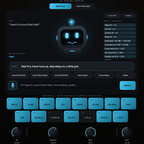
MIXI is an AI vocal chain you talk to or type to. Ask for less reverb, more delay or a wider voice, and it changes the chain and shows every value it touched. Speech recognition runs inside the plugin and works offline. It hears you through the input of the track, so in Bitwig arm the track and turn input monitoring on before you press the mic.
Booth does the same with typed requests: fourteen modules in studio order, from gate and tuning to delay, reverb and a safety limiter. Type "warmer" or "delay 1/8" and it lists each change, and UNDO takes the whole request back.
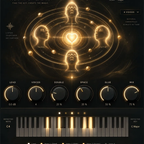
Harmony listens to the lead and builds harmonies in the key of the song: thirds, fifths, octaves and wider voicings, each with its own level and pan. Every voice keeps the formants of the original singer. Put it after the lead chain, or on a duplicate of the vocal track if you want to process the harmonies separately.
Quaver synthesizes the 808 from scratch: a sine with a pitch drop, added harmonics, soft-clipping drive, a sub one octave below and a noise click for the attack. Legato mode is on by default, so overlapping notes glide at the GLIDE time without retriggering, which is the drill slide. It comes with 990 presets across eleven genres.
Sub Heat adds four saturation characters to a bass or 808 so it stays audible on small speakers. Lock fixes the kick and bass cancelling each other: put it on the bass, send the kick to its sidechain, and it measures the offset and polarity, then locks a precise delay so both add up.
Hatch writes hi-hat patterns in Trap, Drill, House, Boom Bap or Rage, with rolls, pitched rolls, open hats and swing. Patterns lock to the song and go out as MIDI, and you can drag one onto any track as a MIDI file to play your own samples.
Climb turns a track, a group or the master into a build-up with one knob: a rising high-pass, noise, a pitch lift, a growing reverb and a wider image, all moving together. Lift synthesizes risers, downlifters and impacts in time with the song, then lets you drag the WAV straight onto a track. Spool catches a slice on the beat and rolls it from a beat repeat down to a pitched buzz, which is the fill that ends many drops.
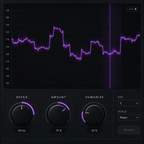
Strobe is a tempo-synced volume shaper. Draw a curve and every beat or bar follows it, from classic ducking to stuttering gates, without setting up a compressor sidechain.
Bitwig users tend to like building sounds, so the instruments worth adding are the ones with a clear character. Squelch is a monophonic acid bass with a resonant diode filter, accent, slide and a 16-step sequencer locked to the song. Riot plays the hoovers, stabs and rave pianos of early-90s rave, synthesized rather than sampled, then crushes them through a lo-fi stage. Arcade is a two-oscillator synth with a ladder filter and an arpeggiator, inside an arcade cabinet with a joystick.
For ideas, Transcribe turns audio into MIDI: sing or play a line and get the notes, or drop a file and drag the result into the arranger. Resonate tunes drums and noise to the key of the song with a bank of resonators.
This is where Bitwig differs from most hosts. A plugin sits in the device chain like a native device, and you can add Bitwig modulators to it: an LFO, an envelope follower, a step sequencer or a random source. Map one to any plugin parameter and the movement follows the song.
If a parameter does not appear in the mapping list, open the plugin, move the control once, and Bitwig adds it.
Plugins that take a sidechain, like Lock, show a sidechain selector in the device header. Pick the source track there, usually the kick, and the plugin hears it without any extra routing. Check that the source track keeps playing to the master, or you will lose the kick from the mix while setting this up.
When a chain works, select the devices, right-click and save them as a preset, or save the whole track as a track preset. Your next session then starts with the vocal track ready, plugins and modulators included.
For a sensible order inside a vocal chain, put tuning first, cleanup second, compression and saturation third, harmonies or doubles after that, and delay and reverb last. An all-in-one chain already follows that order, so avoid stacking the same stages around it.
If one job slows you down, start with the one plugin that fixes it. If you want several tools for the same job, compare the plugin bundles, which group plugins by use.
Black Friday: code BLACKFRIDAY works on eligible TuneDrip plugins and plugin bundles through December 1, once per customer. Spool is not included. The Black Friday plugin guide sorts the range by use.
Usually the plugin was installed as AU only, or to a folder Bitwig does not scan. Install the VST3 version, check the folders in Settings under Locations, and restart Bitwig.
No. TuneDrip plugins are made for Windows and macOS only.
Some processing needs analysis or look-ahead, which adds latency. Bitwig compensates it on playback but cannot remove it from live monitoring. Use a shorter chain while tracking, or the direct monitoring of your interface.
Each licence activates on 3 computers and is a one-time purchase.
Pick the job that slows you down most, add one plugin, map a modulator to it and finish a track. The rest of the range is in the plugins for Bitwig collection.