A stack of vocals only sounds like one big voice when every take starts, moves and stops with the lead. A double that lands a few milliseconds late smears the consonants, a harmony that holds a note past the lead leaves a tail hanging, and an ad-lib that drifts makes the whole hook feel loose. Aligning vocals fixes that.
This guide explains how to align vocals by ear, by hand in your DAW and with a vocal alignment plugin, with notes for FL Studio, Logic Pro, Cubase, Ableton Live and the rest.
What "aligned" actually means
Alignment is about timing, not pitch. Three moments matter in every word:
-
The attack: the start of the word, and above all the consonant. Hard sounds like T, K, P and S expose any gap straight away.
-
The vowel: the long middle part. If the vowel of the double changes shape at a different time from the lead, the pair sounds phasey and chorused.
-
The ending: where the phrase stops. A take that runs past the lead leaves a stray tail, especially on S and T endings.
Perfect alignment is not always the goal. A pop hook usually wants doubles locked tight, while a soulful backing part or a gang vocal can stay a little loose so it sounds like several people. Decide how tight the section should be before you start editing.
Step 1: record takes that are easy to align
The less there is to fix, the more natural the result.
- Record the lead first and comp it until you are happy. Everything else is aligned to it, so it must be final.
- Record doubles and harmonies while listening to the lead in your headphones, not just the beat.
- Sing the doubles with the same phrasing, the same breaths and the same word endings as the lead.
- Go easy on consonants in the backing takes. Let the lead carry the hard sounds.
- Keep every take dry. Reverb and delay hide timing problems while you edit and make them obvious later.
Step 2: decide which takes to align
Not every part needs the same treatment.
-
Doubles: align tightly. They exist to thicken the lead, so they should move with it word for word.
-
Harmonies: align the attacks and endings, and leave a little freedom in the middle of long notes.
-
Ad-libs: usually leave them alone. Their job is to answer the lead, not copy it. Only fix one that collides with a word of the main line.
-
Choir or gang parts: align loosely, or align a few takes and keep the rest as recorded so the crowd stays human.
Method 1: align vocals by hand
Every DAW can do it with editing alone. It takes time but gives full control.
- Zoom in on the lead and the take, one above the other.
- Cut the take at the start of each word or phrase, just before the consonant.
- Slide each piece so its attack lines up with the attack of the lead. Use the waveform first, then trust your ears.
- Where a word is longer or shorter than the lead, stretch or squeeze that piece with the time-stretch tool of your DAW.
- Trim endings that run past the lead and add short fades on every cut so nothing clicks.
- Solo the lead and the take together and listen for flamming on consonants.
A verse of doubles can take a long time this way, and it is easy to over-edit until the take sounds robotic. Work phrase by phrase and leave breaths where they are.
Most DAWs include elastic audio that lets you drag parts of a waveform in time without cutting.
-
Logic Pro: turn on Flex Time for the take, then drag flex markers on each attack to match the lead. This is the usual answer to "how to align vocals in Logic Pro".
-
FL Studio: open the take in Edison or use the stretch options of the audio clip, and cut and slide phrases in the playlist. Some editions also include tools for editing timing note by note.
-
Cubase: use AudioWarp to drag warp tabs, or the timing features of VariAudio on editions that include it.
-
Ableton Live: turn on Warp for the clip and move warp markers to the attacks of the lead.
-
Studio One and REAPER: use bend markers in Studio One and stretch markers in REAPER the same way.
These tools are precise, but you still place every marker yourself. On a full song with four doubles and two harmonies, that is hundreds of markers.
Method 3: use a vocal alignment plugin
An alignment plugin listens to the lead and to the take, finds the matching moments and moves the take for you.
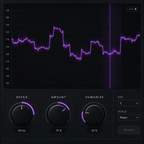
Trace works this way. It moves every attack, vowel and phrase ending of a take onto the lead, stretching or squeezing word by word without changing its pitch or its tone.
- Insert Trace on the double, the harmony or the choir part.
- Send the lead vocal to its sidechain input.
- Press CAPTURE and play the section. When you stop, the take is aligned, and the screen draws a line from where each moment was to where it now lands.
- Set TIGHTNESS, from the take as recorded to fully locked on the lead. Keep doubles high and backing parts lower so the stack stays human.
- Use MAX STRETCH to stop long notes being pulled too far, and RANGE to set how far it searches, up to half a second either way.
- Shift-drag on the screen to protect a breath or a late ad-lib so it stays exactly where it was.
- Print the result with RENDER WAV, or drag the file straight onto a new track. The file is identical to what you hear.
To align several takes to the same lead, put one Trace on each take and send the same lead to all of them. Each take is aligned on its own and can have its own tightness. When you are short on time, LIVE mode aligns as the song plays, with a latency your DAW compensates.
Trace also has a PITCH control that pulls a double towards the notes of the lead, folded to the octave. Leave it at zero on harmonies, which are meant to sing other notes.
Align first, then process
Order matters. Align the raw takes before tuning, compression and effects, because a tuned and compressed take hides the attacks the alignment needs. A typical order for a stack is:
- Comp and clean the lead.
- Align doubles, harmonies and choir takes to it.
- Tune lightly.
- Send the stack to one bus for EQ and compression.
- Add delay and reverb last.
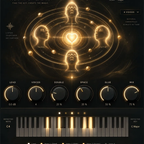
If you do not have doubles at all, you can create them after the lead is done. Stack makes up to thirty-three copies of one voice, each shifted in time, detuned and placed in the stereo field, and its TIMING control goes from tight doubles to a loose choir. For a comparison of approaches, see the guide to the best vocal doubler plugins.
How to check your alignment
-
Listen in solo: play the lead and one take together. Consonants should sound like one hit, not two.
-
Listen in mono: phasing and hollow vowels are easier to hear when everything is summed.
-
Listen to the endings: every S and T should stop together. Trim stray tails.
-
Listen in context: a stack that sounds slightly loose in solo often sounds right with the beat. Do not lock everything just because you can.
Common mistakes
-
Aligning to an unfinished lead. If you comp the lead again later, every take has to be aligned again.
-
Locking every part. A fully locked stack can sound like one processed voice instead of several singers.
-
Stretching long notes too far. Large stretches can sound smeared. Re-record the line instead.
-
Aligning wet takes. Reverb tails and delays confuse both your eyes and an alignment plugin.
-
Forgetting the breaths. Moving a breath onto a word makes it audible. Protect breaths or cut them.
Where alignment fits in a full vocal chain
Once the stack moves together, the rest of the chain has an easier job. Harmonies can be built on top with Harmony, harsh resonances that pile up across several takes can be controlled with Smooth, and the lead can go through a full chain in one window such as VoxShift. If you are writing the parts from scratch, the guide on how to make vocal harmonies covers intervals and arrangement.
TuneDrip plugins are VST3 and AU, so they load in FL Studio, Logic Pro, GarageBand, Ableton Live, Cubase, Studio One, REAPER and Bitwig. They have no AAX version yet, so in Pro Tools align takes with the built-in editing tools.
Black Friday: code BLACKFRIDAY works on eligible TuneDrip plugins and plugin bundles through December 1, once per customer. Spool is not included. Trace, Stack, Harmony, Smooth and VoxShift are all eligible. See the Black Friday plugin guide for picks by use.
FAQ
Does aligning a vocal change its pitch?
It should not. Good alignment moves and stretches the take in time only. Trace keeps the pitch and the tone of the take unless you raise its PITCH control.
Should ad-libs be aligned?
Usually not. Ad-libs answer the lead and sound best a little free. Fix only the ones that clash with a word of the main line.
How tight should doubles be?
Tight on consonants and endings, slightly freer inside long vowels. If the stack starts to sound like one processed voice, lower the tightness.
Can I align vocals in GarageBand?
GarageBand has basic cutting and moving of regions, which is enough for short sections. For a whole song, load an alignment plugin in its AU version on the take.
Start with one double on one hook. Once it moves with the lead word for word, align the rest of the stack the same way with Trace.