Plugins
Best Plugins for Mastering: A Simple Master Bus Chain
Mastering is the last stage before a track goes out. The goal is not to fix the mix. It is to make the whole song sound balanced, controlled and competitive...
Most mixes do not need more plugins. They need the right plugin at each stage: something to clean up harsh frequencies, something to control the drums, something to make the kick and the bass agree, something to place sounds in a space and something to glue the whole thing together. This guide walks through the best plugins for mixing stage by stage, explains what each type of tool does, and points to the TuneDrip plugins that cover each job, next to the stock tools already inside your DAW.
Every major DAW ships a solid EQ, a compressor, a limiter, a basic reverb and a delay. Logic Pro, FL Studio, Ableton Live, Cubase, Studio One and REAPER all include them, and many professional mixes still rely on stock EQ for most corrective moves. Before you add anything, make sure you can do three things with stock tools: cut low rumble with a high-pass filter, tame a loud part with a compressor, and keep the master under 0 dBFS with a limiter. Third-party plugins earn their place when they do a job faster, more transparently or with a character the stock tools do not have.
A static EQ cut is always on, even when the problem is only there for one note or one word. Dynamic tools react only when a frequency pokes out, which keeps the sound open the rest of the time. Dynamic EQs and resonance suppressors from several developers work on this principle.
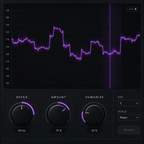
Use it on vocals, acoustic guitars, cymbals and dense synth buses. Start with low DEPTH and listen to DELTA: if you hear the tone of the instrument instead of only the harsh part, back it off.
Drums decide whether a mix feels loud and alive. The usual tools are transient shapers, saturation and clippers, often stacked one after the other. An all-in-one drum processor saves the routing.
For more on drum processing, the guide to what tape saturation does explains how saturation adds density without raising peaks.
The low end is where most home mixes fall apart. Two problems come up again and again: the kick and the bass cancel each other, and the bass disappears on small speakers. Sidechain compression, phase alignment and saturation are the standard fixes.
For trap and hip-hop in particular, the guide to the best 808 plugins goes deeper into low-end tools.
Reverb and delay are what turn a stack of tracks into a room. The mistake is to add one big reverb to everything. Mixers usually use a short space for depth, a longer one for size, and modulation or delay for width.
Clean mixes can sound flat. Tape and analog-style saturation add small harmonic changes and movement that make digital tracks feel recorded.
The last stage holds the mix together. Bus compressors, clippers and limiters are the usual chain. The risk is chasing loudness with peaks instead of density.
Keep a stock limiter after Weld if you need a fixed ceiling for streaming, and compare at matched loudness before deciding that louder sounds better.
Vocals usually get their own chain of tuning, EQ, compression, de-essing, saturation and effects. TuneDrip has dedicated tools for that, from VoxShift, which loads a whole vocal chain in one click, to MIXI, an AI assistant that mixes vocals. The full breakdown is in the guide to the best plugins for vocals.
Black Friday: code BLACKFRIDAY works on eligible TuneDrip plugins and plugin bundles through December 1, once per customer. The plugin bundles group several of these tools by task.
TuneDrip plugins run as VST3 on Windows and macOS and as Audio Units on macOS, so they load in FL Studio, Ableton Live, Logic Pro, Cubase, Studio One, REAPER, Bitwig and GarageBand. See the guides to the best plugins for Logic Pro and the best FL Studio plugins for DAW-specific tips.
No. Start with stock tools and add one plugin for the stage where your mixes struggle most: harshness, drums, low end, space, color or bus glue.
Weld, Aura and Tape can all go on a master bus in small doses. For a commercial release, compare your master at the same loudness as a reference track before you export.
The best plugins for mixing are the ones that solve a specific problem at a specific stage. Browse all TuneDrip plugins and pick the one that fixes the stage where your mix falls short today.