Plugins
Best Ableton Plugins for House, Techno, Vocals and Build-Ups
Ableton Live comes with a strong set of stock devices, and most producers still add a handful of third-party plugins for the jobs Live does not cover on its own:...
Logic Pro comes with a large stock library of effects and instruments, so the plugins worth adding are the ones that do something the stock set does not do quickly: harmonies and choirs from one take, doubles that stay on the lead, resonances tamed without a manual EQ hunt, and instruments with a sound of their own. This guide covers the plugins that earn a place in a Logic Pro session for vocals, mixing and sound design, where each one goes in the channel strip, and how to keep the list short.
Every plugin below comes from the plugins for Logic Pro collection. They are available as AU, the format Logic Pro uses, on macOS 12 or later.
After installing, Logic Pro validates new Audio Units the next time it opens. If a plugin does not appear, open the Plug-in Manager from the Logic Pro settings, check that it passed validation and reset it if needed. The guide on how to install VST3 and AU plugins on Mac and Windows lists the folders and common fixes.
Stacking vocals in Logic Pro usually means recording several takes, editing them with Flex Time and Flex Pitch, and spending an evening lining them up. These plugins shorten that work.
Harmony listens to the lead and builds diatonic harmonies in the key of the song: thirds, fifths, octaves and wider voicings, each with its own level and pan. It is a fast way to sketch a harmony arrangement before deciding which parts to record for real, or to finish a hook when the singer has already left the studio.
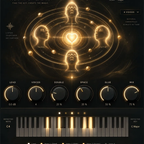
Choir turns a single vocal take into a choir of up to thirty-two singers, split into four sections that sing real harmonies in the key of the song. Harmonies are detected automatically or set on the keyboard. Use it on a Bus fed by the lead for big gospel-style chorus moments, ambient pads made of voices, or intros that need width.
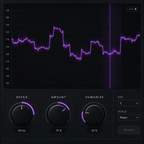
Stack makes up to thirty-three copies of a voice, guitar or synth, each shifted in time, detuned by a moving chorus and placed in the stereo field. When you record real doubles instead, Trace pulls each double onto the timing of the lead: put it on the double, send the lead to its sidechain, press CAPTURE and play the section. Every attack, vowel and phrase ending of the take lands on the lead.
Smooth listens to the spectrum continuously, finds the narrow peaks that stick out above the overall tonal balance and cuts them only while they last: sibilance, a harsh cymbal, a muddy low-mid, a note that pokes out, or the proximity effect of a close mic. It replaces a lot of static EQ notches that would also dull the parts of the sound you want to keep.
Aura adds air, presence and brightness in a simple interface. Under the hood is a tuned chain of EQ, harmonic excitation and stereo widening, tamed so the top end stays smooth. Place it after Smooth on a vocal so the plugin that removes harshness comes before the one that adds shine.
Tape recreates the wobble, hiss and warmth of old cassettes. Choose one of eight cassettes, then dial in wear, drift, heat and glow. A light setting on a drum or keys Bus adds glue and character; a heavy setting gives a lo-fi, worn sound for intros and interludes.
Logic Pro's own instruments cover a lot of ground. These add sounds with a different character for producers who want parts that do not sound like a stock patch.
Two creative tools help at the start of a song. Transcribe turns audio into MIDI: in Live mode every note you hold becomes a MIDI note as you sing or play, with velocity taken from the attack, so a hummed idea becomes a part for any instrument. Tonic listens in real time and shows the key and mode in big letters, with a confidence meter, a chromagram and a circle of fifths, which is useful before you set the key for Harmony, Choir or Resonate.
For several tools at once, the plugin bundles group plugins by workflow, and the full TuneDrip plugins catalogue lists every plugin by category.
Yes. They are available as AU, the format Logic Pro loads, on macOS 12 or later. The same plugins are also available as VST3 for other DAWs on Mac and Windows.
Logic Pro validates new Audio Units when it starts. Open the Plug-in Manager from the Logic Pro settings, check that the plugin passed validation and reset or rescan it if needed.
On the lead vocal's Audio FX slots, or on a Bus fed by a send from the lead if you want to keep the dry lead untouched and blend the harmonies under it.
Insert Trace on the double, then choose the lead vocal track in the Side Chain menu at the top of the plugin window.
Right after checkout you receive an email with your download links and a license key. The TuneDrip Hub installs and activates the plugins on Mac.