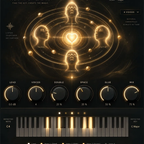
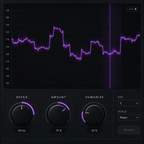
Formant shifting is the reason one vocal can sound like a giant, a child, a cartoon or a completely different singer while still hitting the same notes. It is also the reason a pitched-up vocal sometimes sounds like a chipmunk and sometimes sounds like the same person singing higher. This guide explains what formants are, what a formant shifter actually changes, and how to formant shift vocals in your DAW without wrecking the take.
If you already know the theory and just want the tool, Pivot is the formant shifter plugin we built for this job: pitch and formant on separate controls, in real time, as VST3 and AU.
Every voice has a pitch, the note you hear, and a timbre, the colour that tells you who is singing. Formants are a big part of that colour. They are the resonant peaks created by the shape and size of the throat, mouth and nasal cavity. A long vocal tract produces lower formants and a darker, bigger voice. A short vocal tract produces higher formants and a smaller, brighter voice.
The key point for producers: pitch and formants are two different things. A singer can hit a high note without their throat getting shorter. Their formants stay roughly where they are, which is why they still sound like themselves at the top of their range.
Formant shifting moves those resonant peaks up or down without changing the note. Shift the formants down and the voice sounds larger, deeper and more chesty, even though the melody is identical. Shift them up and the voice sounds smaller, younger or more synthetic.
Traditional pitch shifting moves everything together. When you raise a vocal by an octave with a basic shifter, the formants rise with it, the vocal tract is effectively shrunk, and you get the classic chipmunk sound. A formant-aware shifter separates the two, so you can:
-
Change the note, keep the character. Transpose a vocal up or down and keep the singer sounding like the singer.
-
Keep the note, change the character. Make a voice sound bigger, smaller or stranger without touching the melody.
-
Move both, by different amounts. The creative middle ground behind many modern vocal effects.
Natural transpositions
A rough take was sung in the wrong key, or a sample needs to fit a new beat. Shifting the pitch a few semitones with the formants held in place gets you a transposed vocal that does not announce itself as processed.
Pitched-down and pitched-up vocal effects
The dark, slowed vocal sound in trap and the bright, pitched-up hook in hyperpop and dance music are both formant decisions. Often the trick is to move the pitch a lot and the formants only partly, so the effect is obvious but the words stay clear.
Backing vocals that do not sound like copies
Stacking the same singer many times can sound like one person cloned. Nudging the formants slightly on a few layers makes them read as different voices: lower formants under the lead, higher ones above it.
Character and sound design
Monster voices, robots, talking instruments and vocal chops all lean on formants. Push them far and the voice becomes a texture you can play like a synth.
The workflow is the same in any DAW. The examples use Pivot because its controls map directly onto the concepts, but the steps apply to any formant-capable tool.
-
Start with a clean, tuned take. Formant processing tracks the voice in real time. Breaths, heavy reverb and doubled parts make that harder, so put the shifter early in the chain, after any pitch correction and before reverb and delay.
-
Decide the pitch first. Set PITCH to the register you want in semitones. If you only want to change the character, leave it at zero.
-
Choose how much the formant follows. LINK ties the formant to the pitch. Fully linked gives a natural transposition. Unlinked lets you set the formant on its own.
-
Dial FORMANT for size. Move it down for a bigger, darker voice, up for a smaller, brighter one. Small moves go a long way. Listen for the point where the voice changes size without sounding filtered.
-
Blend with MIX. For thickening rather than replacing, keep some dry signal underneath. For a full transformation, run it fully wet.
-
Re-check the EQ after shifting. Lower formants add weight in the low mids, higher formants add brightness. A small EQ move after the shifter keeps the vocal sitting where it was.
Most DAWs give you some form of pitch and formant control, and a dedicated plugin gives you the same control everywhere.
-
Logic Pro: the stock Vocal Transformer separates pitch and formant, and any AU formant plugin loads on a channel insert.
-
Ableton Live: the Complex Pro warp mode has a Formants setting for clips; for real-time control on a track, load a VST3 or AU plugin as an audio effect.
-
FL Studio: load a formant-capable VST3 plugin on a mixer insert routed from the vocal channel, so you can automate it like any other effect.
-
Studio One, Cubase, Reaper, Bitwig and GarageBand: all load VST3 or AU plugins on the vocal track, which is the simplest way to get the same formant workflow across sessions.
Pivot runs in all of these hosts: VST3 and AU on macOS (Apple Silicon and Intel) and VST3 on 64-bit Windows. It is not available as AAX for Pro Tools yet.
-
Too much, too early. Large formant moves on a lead vocal quickly sound artificial. Start subtle on leads and save the extreme settings for effects and chops.
-
Shifting a reverb tail. Put the shifter before time effects. A formant-shifted reverb tail smears and loses detail.
-
Feeding it chords. Formant tracking is designed for single voices and monophonic sources. On a full chord or a stacked bus it becomes a creative effect rather than a clean transformation.
-
Forgetting the words. If the lyric gets harder to understand, the formant has moved too far from the pitch. Bring LINK back towards the pitch until the consonants return.
Formants come up in more places than a dedicated shifter. Several TuneDrip vocal plugins treat them deliberately:
-
Harmony builds diatonic harmonies in the key of your song, and every harmony voice keeps the formants of the original singer, so the stack sounds like a choir of you rather than chipmunks.
-
Choir turns one take into up to thirty-two singers in four sections, with a FORMANT control that sets the size of the voices.
-
Tune Live corrects pitch in real time with a PSOLA engine that leaves the formants where they are, so a tuned singer still sounds like the singer.
-
Tint prints a colour onto your track, with a SHIFT control that moves the colour's formants up or down by up to an octave without changing the pitch.
-
MIXI includes pitch correction with formant inside a full vocal chain you adjust by typing what you want.
For a wider look at pitch tools, see our guide to the best pitch shifter plugins for vocals. For stacked parts, how to make vocal harmonies walks through building a hook.
Bigger lead, same melody
PITCH at zero, LINK off, FORMANT slightly down, MIX around halfway. The vocal gains weight and presence without sounding processed. Useful on thin recordings.
Pitched-down dark vocal
PITCH down several semitones, LINK partly on so the formant follows only some of the way. The voice gets deep and heavy, but the words stay readable.
Pitched-up hook
PITCH up, FORMANT left closer to the original than the pitch. The hook sounds higher and brighter without collapsing into a cartoon. Add a doubler or harmonies afterwards for width.
Black Friday: code BLACKFRIDAY works on eligible TuneDrip plugins and plugin bundles through December 1, once per customer. Spool is not included. Pivot, Harmony, Choir, Tune Live, Tint and MIXI are all eligible. See the Black Friday plugin guide for picks by use.
FAQ
What is the difference between pitch shifting and formant shifting?
Pitch shifting changes the note. Formant shifting changes the resonances that give a voice its size and colour. A formant-aware tool lets you move one without the other.
Why does my pitched-up vocal sound like a chipmunk?
Because the formants rose with the pitch. Hold the formants closer to the original, or unlink them from the pitch, and the voice keeps its natural size.
Can I formant shift vocals in real time?
Yes. Pivot shifts pitch and formant independently in real time on a track insert, so you can automate it like any other effect.
Does formant shifting work on instruments?
It is tuned for voices and monophonic sources. On chords and full mixes it becomes a creative effect rather than a clean transformation.
Start subtle on a lead, push it hard on chops, and keep the words clear. When you want pitch and formant on two separate knobs in every DAW you use, load Pivot on the vocal and listen to how much character a small formant move adds.