Plugins
Best Plugins for Rap Vocals: A Chain, Job by Job
A rap vocal has a different job from a sung one. The words have to land on the beat, stay readable over a loud 808 and keep their attitude when...
A harmony is a second melody that moves with the lead and lands on different notes of the same key. That is all it is, and it is why so many home-made harmonies sound wrong: the notes were shifted by a fixed amount instead of following the key, or the parts were right and simply too loud.
This guide shows how to make vocal harmonies three ways, by singing them, by editing copies of the lead and by generating them with a vocal harmony plugin, then how to mix them in any DAW.
Every decision below depends on the key of the song. If you made the beat, you know it. If you did not, loop the hook and play single notes on a keyboard until one feels like home, then check whether the major or the minor third above it fits. The beat's file name often states the key as well, but test it by ear because labels are sometimes wrong.
Write down the seven notes of that scale. In C major they are C, D, E, F, G, A and B. Your harmonies will use these notes and almost nothing else.
Take a short melody in C major: E, E, D, C. These are the usual parts around it.
Notice that the third above E is G, three semitones away, while the third above C is E, four semitones away. The distance changes with the note. This is the reason a copy of the lead transposed by a fixed number of semitones goes out of key after a few words.
Sung harmonies have the most character, because every take brings its own timing, breath and tone.
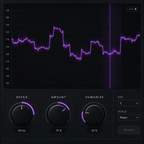
The alignment step decides whether a stack sounds like one voice or like a crowd. You can cut and move words by hand, or use Trace: put it on the harmony take, send the lead to its sidechain, press CAPTURE and play the section. It moves each attack and phrase ending onto the lead without changing the pitch, and TIGHTNESS sets how strict it is.
If you cannot sing the part, duplicate the lead and move each note to the harmony note in a pitch editor. Logic Pro has Flex Pitch, Cubase has VariAudio, some editions of FL Studio include NewTone, and REAPER has a manual mode in ReaTune. Work note by note and keep to the scale.
Two problems appear with this method. Large moves change the formants, so the voice turns small and cartoonish going up or heavy going down. And the copy has exactly the timing of the lead, so it can sound like a synth. Keep moves within a fifth, preserve formants when the editor allows it, and nudge each copy by a few milliseconds.
A diatonic harmony plugin does the counting for you: it detects the note being sung and plays the matching note of the key.
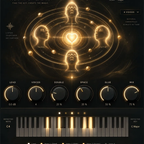
Harmony listens to the lead and builds thirds, fifths, octaves and wider voicings in the key of the song. Each voice has its own level and pan, and keeps the formants of the original singer, so the stack sounds like more of you.
Any pitch-tracking tool works better on a clean, dry, single voice. Record close to the microphone, keep the beat out of it by using closed headphones, and place reverb after the harmonies.
If you are comparing tools, the guide to the best harmonizer plugins for vocals explains how the main types differ.
These three get confused, and they solve different problems.
A hook often uses two of them: doubles under the whole section and a harmony on the last line or the key words.
Harmonies work through contrast. If they play from the first bar, the hook has nowhere to grow.
Start with each harmony roughly 6 to 12 dB under the lead. Mute and unmute the group: you should miss it when it is gone more than you notice it when it is there.
Keep the lead in the center. Pan matching parts opposite each other, for example one left and one right by the same amount. Check in mono afterwards to make sure nothing disappears.
Send all the parts to one bus. Cut the low end higher than on the lead, often somewhere around 150 to 250 Hz, and take a little out between 2 and 5 kHz so the words of the main vocal stay in front. If the stack gets harsh, a dynamic tool such as Smooth cuts the resonances only when they stick out.
Compress harmonies harder than the lead, since they need to sit still. Give the bus slightly more reverb than the lead to push it back a step.
TuneDrip plugins are VST3 and AU, so the plugin method is the same nearly everywhere.
Black Friday: code BLACKFRIDAY works on eligible TuneDrip plugins and plugin bundles through December 1, once per customer. Spool is not included. Harmony, Choir, Stack, Trace and Smooth are all eligible. See the Black Friday plugin guide for picks by use.
Yes. Re-pitch copies of the lead in an editor, or let a diatonic plugin generate the parts from the take you already have.
One is enough for many songs. Two, one above and one below, cover most hooks. Add more only for the biggest section.
Either the key or scale is wrong, or the part was transposed by a fixed number of semitones. Move each note within the scale instead.
Start with one third on one line of your hook. When that feels right, build the rest of the stack around it with Harmony or with your own voice.