Plugins
Best Ableton Plugins for House, Techno, Vocals and Build-Ups
Ableton Live comes with a strong set of stock devices, and most producers still add a handful of third-party plugins for the jobs Live does not cover on its own:...
Search for the best autotune plugin and you get a long list of names with very little about what actually changes from one tool to the next. This guide takes the opposite route. It explains the handful of controls that decide how a pitch correction plugin sounds, what each kind of tool is good at, and which setup fits rap, singing, live performance and the main DAWs. Where TuneDrip makes a tool for the job, we say what it does and link to it, next to the options you already have inside your DAW.
An autotune plugin listens to a monophonic voice, detects the note being sung, and pulls it toward a target note chosen from a key and scale. Every pitch correction tool on the market does a version of this. The differences come from four places:
These sit on the vocal track and correct the voice as it plays. They are the fastest way to get the hard-tuned rap sound or a gentle polish on a ballad, and they are the only option for live shows. You set the key, the speed and the amount, and everything that goes through the track is corrected.
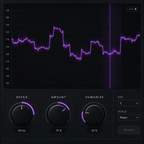
The Tune Live auto tune plugin is TuneDrip's real-time option. It corrects toward the nearest note of the key with a PSOLA engine that leaves the formants where they are, so the singer still sounds like the singer. You click the key on a large keyboard or let AUTO KEY find it while you sing, then choose Chromatic, Major, Minor or Auto. RETUNE SPEED runs from an instant, robotic setting at 0 ms to a transparent one around 200 ms, FLEX-TUNE leaves slides and blue notes alone, HUMANIZE relaxes held notes and NATURAL VIBRATO adds a gentle vibrato on long notes. The readout shows the note sung, the note corrected and the cents applied, which makes it easy to see what the plugin is doing.
Graphical editors analyse a recorded take and draw each note as a block you can move, stretch or flatten by hand. They are slower to use but give note-by-note control, which is useful for exposed lead vocals in pop and R&B where you want to fix three notes and leave the rest untouched. Many DAWs ship one: Logic Pro has Flex Pitch, Cubase has VariAudio and FL Studio has Newtone. If you only need to correct a few notes in a finished take, start there before buying anything.
The third family puts pitch correction inside a complete vocal chain, next to EQ, compression, saturation, delay and reverb. The advantage is speed: the tuning is already set to work with the rest of the chain, and one preset gives you a finished sound. This is the route most beginners end up taking, because the tuning amount is only half of a modern vocal sound.
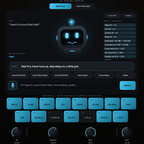
VoxShift stacks tuning, EQ, compression, saturation, doubler, delay, reverb and a limiter in one window and ships with 409 ready-made chains for singing, rap, doubles, ad-libs and SFX. Its Auto Key listens to the vocal, finds the key and locks to it in about two seconds, and auto-gain keeps the output at the level of the dry vocal while you flip through presets. Booth is a fourteen-module chain with a TUNE module you control in plain words: type "hard tune" or "key of A minor" and it makes the change and lists it. MIXI goes one step further: you press the mic and say what sound you want, and it builds the whole chain, tuning included, with every value shown before and after.
The modern rap sound is mostly about speed. You want the voice to land on the note instantly, with no slide in between, so the pitch steps from note to note. On Tune Live the starting point given on the product page is SPEED 0 to 10 ms, AMOUNT 90 to 100 % and a Minor scale, which is the key most trap beats sit in. Two habits make the biggest difference:
If you would rather start from a full chain than tune each setting, the Trap Vocal Chain bundle groups three TuneDrip vocal tools in one purchase.
For sung vocals the goal is the opposite: correction you do not hear. Slow the retune speed down, lower the amount and let the singer's slides and vibrato through. Tune Live's own starting point for a ballad is SPEED 150 to 250 ms, AMOUNT 50 to 70 % and HUMANIZE 40 to 60 %. FLEX-TUNE helps further by only correcting when the singer is already close to a note, so intentional bends stay intact.
Once the lead is in tune, harmonies are the next step. Harmony listens to the lead and builds diatonic harmonies in the key of the song (thirds, fifths, octaves and wider voicings), each with its own level and pan, and keeps the formants of the original singer. Because it needs a stable pitch to follow, it works best after the tuning stage.
On stage, latency matters more than anything else. A plugin that needs a long look-ahead will put the corrected voice behind the singer, which is hard to perform with. Tune Live has a fixed latency that is reported to the DAW; for the singer's headphones, the product page recommends the direct monitoring of your audio interface or a short buffer. Keep the key set before the song starts rather than relying on automatic detection, which needs a few seconds of singing before it locks.
If you record and mix through a full chain, MIXI has a LIVE mode that cuts its latency to about 35 ms at 48 kHz while you track, then you switch it off to mix.
All the TuneDrip plugins in this guide load as VST3 or AU on Mac and Windows, so they work in FL Studio, Ableton Live, Logic Pro, Studio One, Cubase, Reaper and the other hosts that load those formats. A few DAW-specific notes:
Pitch tools are not only for fixing notes. Pivot shifts pitch and formant separately in real time: move the note without changing the size of the voice, or reshape the timbre without touching the melody. That is how you get deep, pitched-down ad-libs or small, bright doubles. For a crowd of voices on the same note, Stack multiplies one take into up to 33 voices, and Choir turns a single vocal into a full choir.
Black Friday: until December 1, TuneDrip plugins and plugin bundles take an extra 20% with code BLACKFRIDAY at checkout. Our Black Friday plugin guide lists what to pick by use.
Every TuneDrip plugin comes with an unlimited demo, so you can check the tuning on your own voice and your own beats before you buy. Browse all of them in our vocal plugins collection, and see how a full vocal chain is built to place the tuning stage correctly.
The one that makes the key easy to set. Most bad results come from a wrong key, not from the plugin. A tool with automatic key detection, such as AUTO KEY on Tune Live or Auto Key on VoxShift, removes that step.
First, or right after a gate or a clean-up EQ. Pitch detection works best on a dry signal, before compression, saturation, delay and reverb.
Yes, if its latency is low and reported to your DAW. Use your interface's direct monitoring or a short buffer for the singer's headphones, and keep the key set before the take.
Good correction moves the pitch and leaves the formants alone, so the voice keeps its character. Tune Live uses a PSOLA engine for that reason, and Pivot lets you move the formants on purpose when you want a different character.