

Hear Doodle in action
6 previews rendered through Doodle.

Melodic Ideas, Always in Key, Out as MIDI.
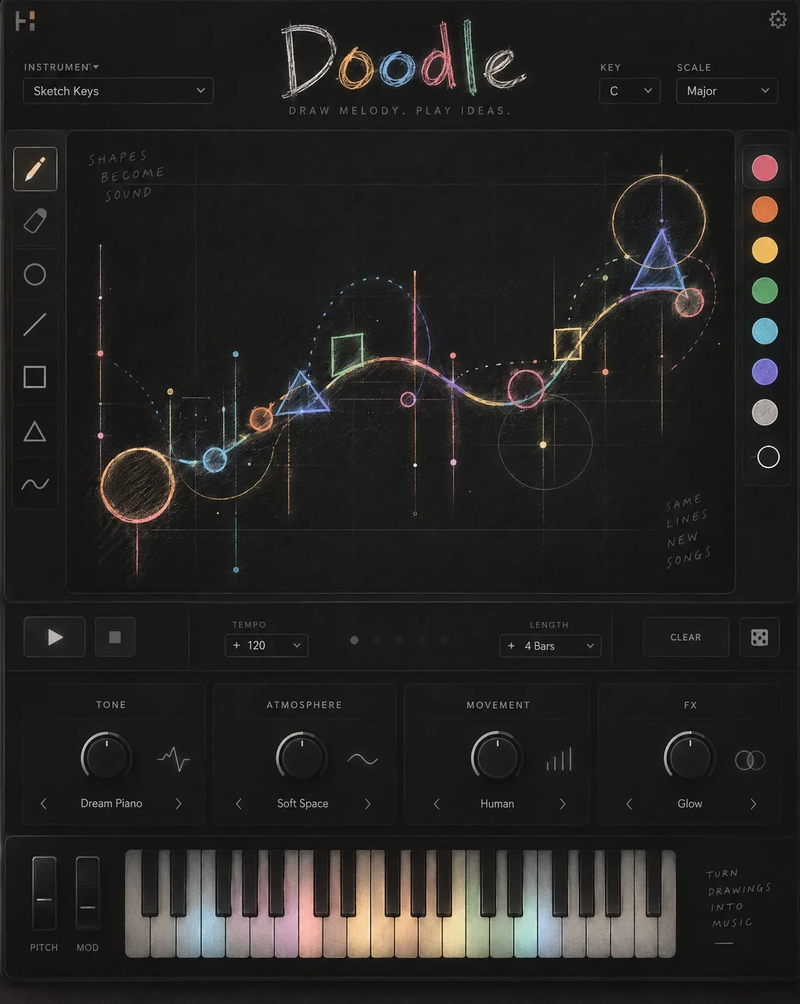
Doodle is a melody sketcher. It draws a melodic idea on a grid, always inside the key and scale you pick from ten scales, and sends it out as MIDI to any instrument, or plays it with its own preview sound so you can hear it without routing anything.
Draw a line on the canvas, pick a shape (Arc, Line, Steps, Peaks, Wave), click the pencil for a new idea or the dice for the same contour with a new rhythm. Hold a MIDI key and the whole pattern transposes to follow it, so chord changes take one finger.
Four macros shape the preview: TONE, ATMOSPHERE, MOVEMENT (humanization and swing, written into the MIDI file too) and FX. Drag the keyboard into your DAW and a MIDI file lands on the track.
Get Doodle
What makes Doodle special?
Melodic Ideas, Always in Key, Out as MIDI.
Doodle is a melody sketcher. It draws a melodic idea on a grid, always inside the key and scale you pick from ten scales, and sends it out as MIDI to any instrument, or plays it with its own preview sound so you can hear it without routing anything.
Draw a line on the canvas, pick a shape (Arc, Line, Steps, Peaks, Wave), click the pencil for a new idea or the dice for the same contour with a new rhythm.
Draw a line on the canvas, pick a shape (Arc, Line, Steps, Peaks, Wave), click the pencil for a new idea or the dice for the same contour with a new rhythm. Hold a MIDI key and the whole pattern transposes to follow it, so chord changes take one finger.
How does Doodle work exactly?
Every control, then the three steps.

- KEY / SCALE – Ten scales, from Major to Blues; every note stays inside.
- SHAPE – Arc, Line, Steps, Peaks, Wave or your own drawing.
- LENGTH – 1, 2, 4 or 8 bars, looped exactly.
- MOVEMENT – Timing and velocity jitter; swing from Straight to Triplet.
- ATMOSPHERE – Dry Room to Infinite on the preview.
- DENSITY – How many notes, 15 to 90 %, from the menu.
- Insert Doodle on an instrument track, pick one of the 32 instrument presets and set KEY and SCALE.
- Press play, then click the pencil or the dice until the idea is right, or draw the contour yourself.
- Drag the keyboard into the DAW to drop the MIDI file, or route Doodle's MIDI output to a synth.
Get Doodle now
Lifetime license · licence key by email · 3 computers.
DOODLE
Lifetime license · 3 computers · Mac & Windows · Instant delivery by email
Draw a Line. Get a Melody.
- Mac VST3 · AU · macOS 12+, Apple Silicon & Intel
- Windows VST3 · Windows 10/11, 64-bit
- Pro Tools AAX not available yet
- Licence Key by email · 3 computers
Compatible with any DAW
Included with Doodle
Everything that ships with the plugin.
Frequently asked questions
Any other question? Write to info@tunedrip.com.
Will I get the same idea back?
Yes. A pattern is its settings plus two seeds and the drawing, all saved with the project and in presets. Lock pattern freezes it while you tweak.
Does it need a synth?
No. The built-in preview sound plays the pattern on its own; the MIDI output is there when you want your own instrument.
Which formats and systems?
Mac: VST3 and AU on macOS 12 or later (Apple Silicon and Intel). Windows: VST3 on Windows 10/11 (64-bit). AAX for Pro Tools is not available yet.
How does the licence work?
A licence key is emailed right after purchase. Paste it in the plugin (or in the TuneDrip Hub) and click Activate: one internet connection, then the plugin works offline. Each key activates up to 3 computers; write to info@tunedrip.com to reset them.
Draw a Line. Get a Melody.
Load Doodle on a track and hear it in a few seconds.
Get Doodle · €19,00 EUR